 800-200-3000
Our complete guide to the SpyDialer opt-out process will help you protect your personal information and improve your online reputation.
In a world where our lives are mostly online, protecting your privacy is crucial. Services like Spy Dialer gather personal information and make it accessible to the public, which is exactly why it’s essential to keep your data secure.
Understanding how to opt out of people-search services is the first step to taking back control of your private data. By walking through the opt-out process for Spy Dialer, you can reduce the risk of data misuse and strengthen your online security.
NetReputation provides information and services to help you protect your digital presence. Call us at 800-200-3000 to learn more, or fill out the contact form below for a free consultation.
What Is Spy Dialer?
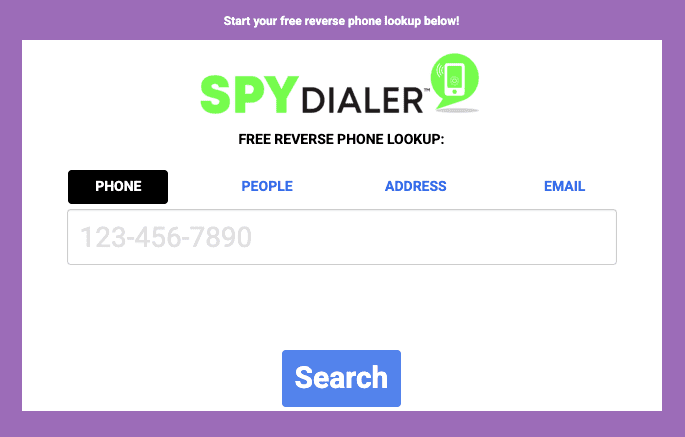
Spy Dialer is an online tool that allows users to look up contact information about others. It provides this information by gathering data from public records and various databases. When you search for someone on Spy Dialer, you can access information like the following:
- Full name
- Current address
- Location on a map
- Phone numbers
- Possible family members
While websites like Spy Dialer make personal details easily accessible, which can be helpful if you’re trying to reconnect with an old friend or family member, it also raises serious privacy concerns.
How Does Spy Dialer Collect Information?
- Public records, including court documents and property records, serve as foundational elements for data collection.
- Social media platforms contribute a wealth of information, revealing personal interests, affiliations, and connections.
- Data aggregation practices enable the consolidation of this information, leading to more comprehensive profiles in Spy Dialer’s database.
Why Would Someone Want to Opt Out of Spy Dialer?
Opting out of Spy Dialer is an important step for individuals concerned about their privacy and personal information being exposed. With the increasing risks of identity theft and data breaches, many people choose to opt out to better protect themselves and comply with privacy laws like the California Consumer Privacy Act.
Individuals can reduce the risk of unauthorized access to their sensitive data by taking action. Here are some reasons why opting out is beneficial:
- Mitigating Risks: Reduce the chances of personal data being harvested and misused by data brokers.
- Enhancing Data Privacy: Help keep sensitive information confidential.
- Regaining Control: Manage what personal information is shared and who can access it.
Ultimately, opting out is a proactive way to improve online security and control one’s digital footprint.
You can take control of your online reputation, whether you’re working on your personal reputation or your professional digital presence. Call us at 800-200-3000 for more information.
How To Opt Out of Spy Dialer
Removing your information from Spy Dialer is a relatively easy process, especially compared to other people search websites that make it much more difficult. However, the Spy Dialer website is very bogged down with ads, and navigating the various pages you’ll need to access can be slow and tedious. Here’s what to do to submit a removal request to Spy Dialer:
Step 1: Find your information on the Spy Dialer site
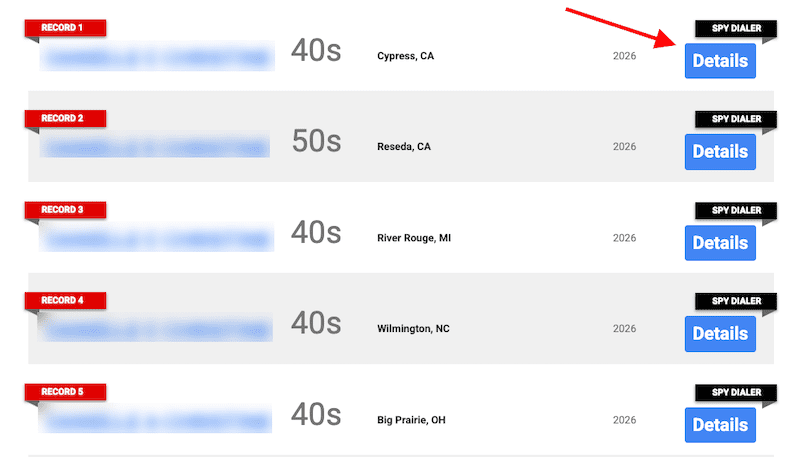
Go to the Spy Dialer homepage and search for your information. You can search by phone number, full name, street address or email address. If any of the information you input matches a profile or profiles in the Spy Dialer database, you’ll see search results. Scan the results and open up the profile that you think is yours. To do that, click the Details button to the right of the result.
Step 2: Go to the removal page
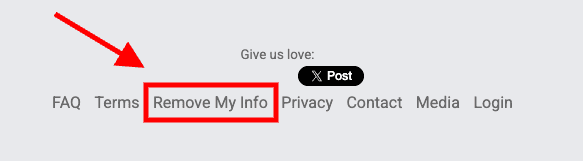
Once you’ve determined that your information exists on the Spy Dialer website, it’s time to go to the removal page. Scroll to the bottom of the page you’re on and click the Remove My Info link in the footer.
Step 3: Begin the removal process
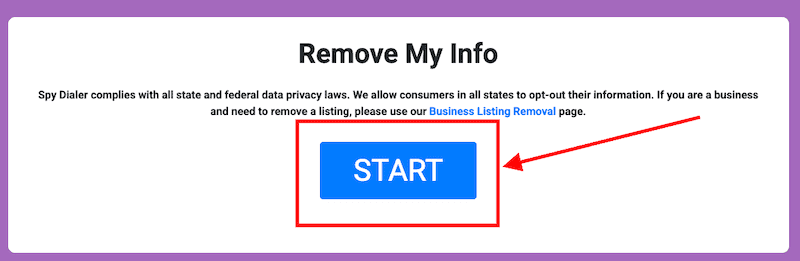
On the “Remove My Info” page, click the large blue Start button.
Step 4: Select your state
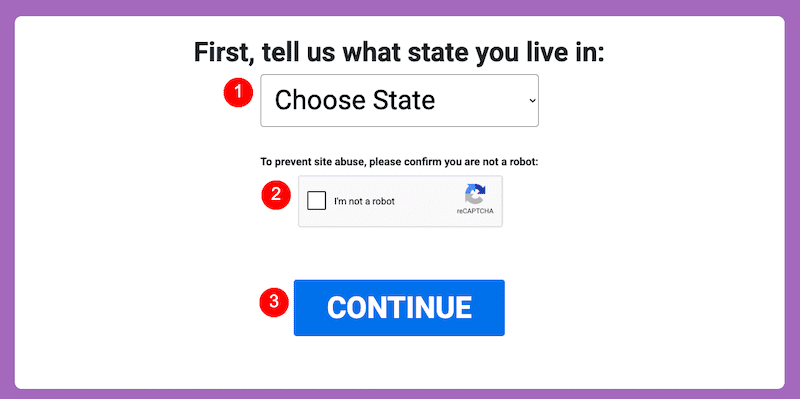
From the drop-down menu, choose your state. Then, click the Captcha Box, followed by the Continue button.
Step 5: Review information about your state’s privacy laws
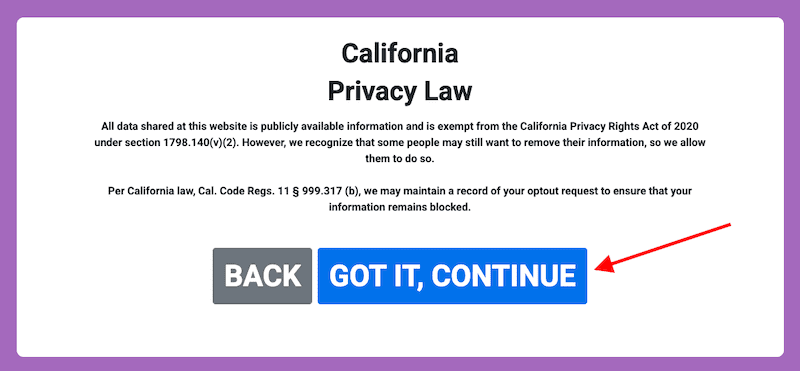
You’ll see information related to the local privacy laws for the state you chose. Review the information, then click Got It, Continue when you’re ready.
Step 6: Enter your personal information
Next, you’ll enter the personal information you want removed from the site. Make sure it matches the data contained in the profile you found during step 1. In order to move forward with the removal process, you have to add at least one name and either one address, phone number or email address. Otherwise, you won’t be able to submit the form.
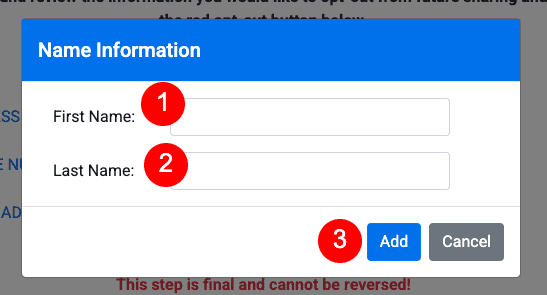
Click Add Name, then enter your first and last name in the pop-up box. Click Add when you’re done. You can then add additional names, if you’d like.
Next, add your address, phone number or email address. To do this, click the link associated with the information you’ll add, then enter the data in the pop-up box. When you’re finished, click Add.
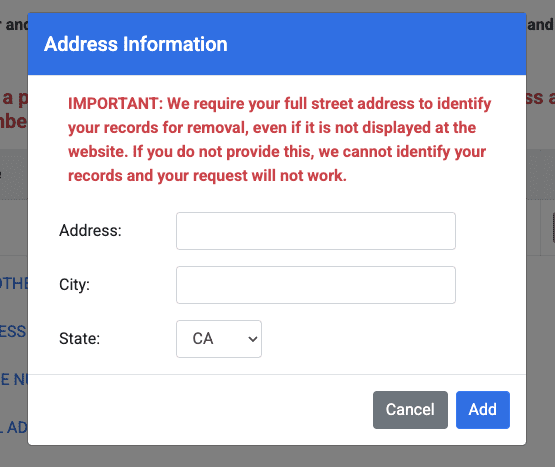
Step 7: Complete the opt-out process
When you’re finished entering your information in the removal form, click the red Opt-Out My Info button.
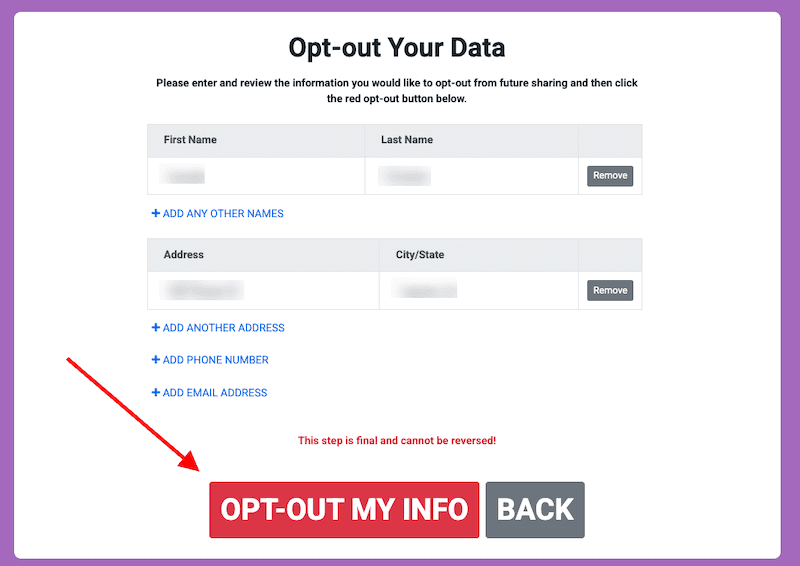
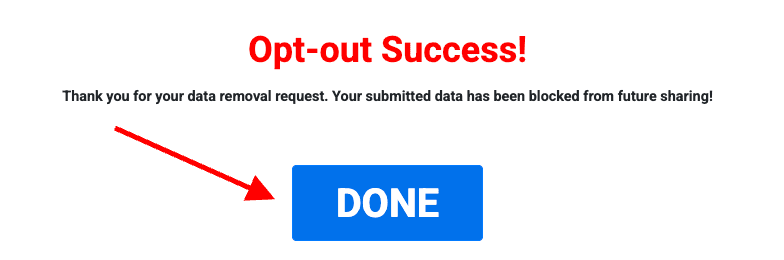
You’ll immediately be redirected to a confirmation page. Click the Done button.
What Happens After You Opt-Out of Spy Dialer?
There’s no clear timeline for when your data will be removed from Spy Dialer once you complete the opt-out process. The only information that the site provides is, “You may remove your information at any time by using the site’s Remove My Info page,” according to the Terms page.
Factors that could influence the removal timeline include:
- Peak Request Periods: High request volumes can delay processing.
- System Updates: System changes may temporarily slow down the process.
- Request Volume: More requests can lead to longer wait times.
Give it a week, and then check the site to see if your information has been removed. If it’s still posted, you can go through the removal process again or contact the site directly using their online form.
Will Your Information Be Completely Removed?
Opting out of Spy Dialer helps reduce your information’s availability on that specific platform, but complete removal isn’t always guaranteed due to data retention policies and other factors. Even after taking steps to remove your data, it could still be stored in other databases, shared with third parties, or accessed through data aggregation services.
This highlights the ongoing challenge of data privacy in the digital world. It’s important to understand that:
- Data retention policies vary across companies.
- Information shared online can increase identity theft risks.
- Opting out of one platform doesn’t mean your data is fully erased from the internet.
Being proactive and staying informed about managing your personal data is essential to maintaining privacy.
Final Thoughts
Opting out of Spy Dialer is an important first step, but it’s only one piece of a much larger online privacy strategy. People search sites continuously collect and republish personal data, which makes ongoing monitoring and proactive management essential to keep your information out of the wrong hands.
To better protect your digital footprint, do the following:
- Regularly audit your online presence
- Adjust privacy settings across your social media accounts
- Watch for new instances of your personal data appearing online
Data removal services and reputation monitoring tools can help streamline these to-dos and alert you to potential risks before they have a chance to escalate.
It’s also important to understand how Spy Dialer and similar platforms gather and distribute publicly available data. While this information is legal to access, it can still expose individuals to unwanted contact, identity theft or scams.
Additionally, staying informed about your state’s privacy regulations can give you the additional leverage you need when requesting data removal. You’ll also be able to make more informed choices regarding your personal information.
At NetReputation, we work with individuals and businesses to help them build and take control of their online reputation. Give us a call at 800-200-3000 to learn more.
 800-200-3000
 Rated #1 by Newsweek
 4.9/5 Trustpilot
 100% Confidential