 by Lindsay Pietroluongo
Deleting a Google account sounds like a trivial choice at first. In reality, though, it’s a major decision that could have long-term consequences for your digital footprint. Plus, it can majorly impact your ability to use the internet as you want to.
If you’re trying to clean up your online presence, protect your privacy or take control of your personal data, it’s important to know that closing a Google account does a lot more than remove your Gmail address. It can affect everything from your important files and photos to your workflow, entertainment and more.
In some situations, deleting Google information can be a strategic way to limit how much inaccurate, outdated or unwanted information is out there about you. At other times, though, getting rid of your Google account can create complications and gaps that are a nuisance to work around.
In this guide, we’ll walk you through how to delete your Google account, plus what you should know before you take that step.
NetReputation provides information and services to help you protect your digital presence. Call us at 844-461-3632 to learn more, or fill out the contact form below for a free consultation.
Request a Free Consultation
What Happens When You Delete a Google Account?
Deleting your entire Google account means you won’t have access to Google services any longer, including:
- AdSense
- Calendar
- Chrome Sync
- Contacts
- Drive
- Gmail
- GPay
- Photos
- YouTube
You’ll also lose access to Google Play purchases, including apps, books, movies, music and TV shows.
Additionally, you may lose access to non-Google services if you use your Google account or Gmail address to log in. To maintain access to your services, it’s best to update your login information and recovery email address for each service before you delete your Google account.
You can take control of your online reputation, whether you’re working on your personal reputation or your professional digital presence. Call us at 844-461-3632 for more information.
What To Do If Your Google Account Has Been Hacked
If your Google account’s been hacked, you may assume that your only option is to delete it and start fresh. However, you may have another option that won’t inconvenience you as much.
Use Google’s Security Checkup feature, which can help you determine the parts of your Google account that were accessed without your permission.
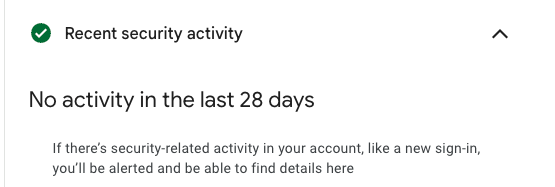
This feature also suggests additional steps you can take to improve your Google account safety, such as confirming your recovery information and turning on safe browsing.
You won’t be able to use Security Checkup on a deleted Google account, so make sure to run the check before moving forward with deletion.
At NetReputation, we work with individuals and businesses to help them build and take control of their online reputation. Give us a call at 844-461-3632 to learn more.
Deleting Your Google Account vs. Deleting Your Gmail Account
If you don’t want to use your Gmail email address or account any longer, you can delete just your Gmail account while leaving your Google account intact.
Note that deleting your Gmail account will not delete your Google account. However, deleting your Google account will also delete your Gmail account.
In order to delete your Gmail account and keep your Google account, you’ll need a different email address to use with your Google account.
What Happens When You Delete Gmail
After you remove Gmail from your Google account, here’s what to expect:
- You won’t be able to use Gmail to send or receive emails.
- Your emails and settings will be deleted after 30 days.
- Nobody will be able to use your Gmail address in the future.
- You’ll still be able to access your Google account and other Google services.
If you decide to recover your Gmail address after deleting it, try to log in using your credentials. If available, follow the steps on screen to recover your account.
How To Delete Gmail
Let’s go over the steps to delete your Gmail account. These are also the steps you’ll take to delete other Google services besides Gmail.
Step 1: Access your Google services
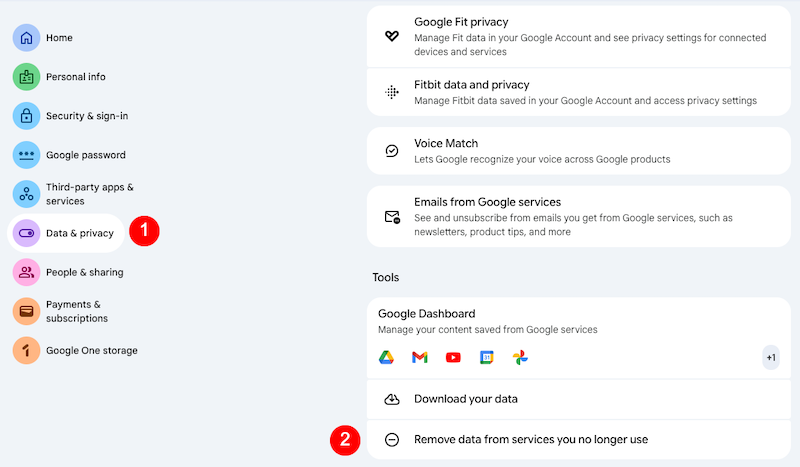
Go to your Google account. Select Data and Privacy from the left sidebar. Under the Tools section toward the bottom, select Remove Data From Services You No Longer Use.
Step 2: Delete your Gmail account
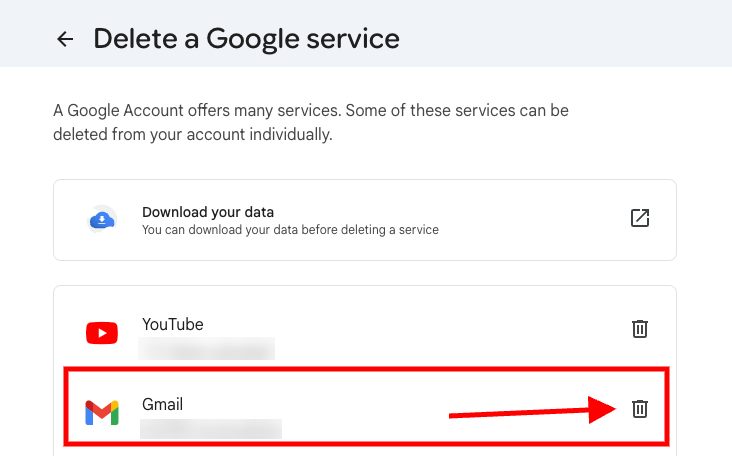
You’ll be redirected to the Delete a Google Service page. Next to Gmail, click the Trash icon.
Step 3: Provide an alternative email address
A pop-up box will ask you to provide a new email address that will be associated with your Google account. Enter the email address in the designated spot, then click the Send Verification Email link on the bottom right.

Step 4: Verify your new email address
Once you receive the verification email at the provided address, your Gmail account will be deleted.
How To Delete Your Google Account Permanently
In this section, we’ll go through each step of the process of deleting your Google account.
Step 1: Sign in to your Google account
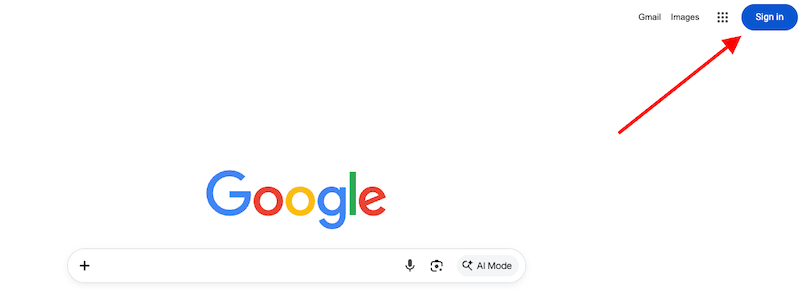
Go to Google.com. If you’re not signed in, click the blue Sign In button on the top right of the page.
Choose your account and enter your credentials to log in to Google.
Step 2: Go to the Google account management page
Once logged in, click your Profile Image on the top right of the page. Click the Manage Your Google Account link.
Step 3: Go to the deletion page
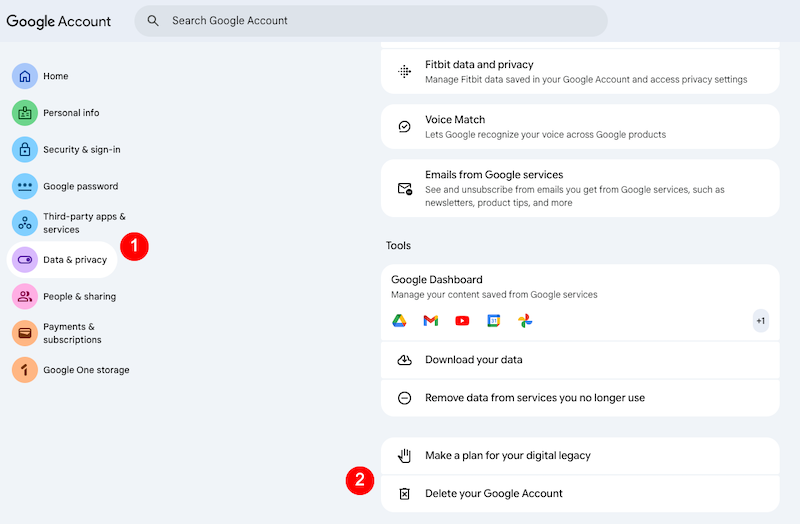
In the account management section, select Data and Privacy in the left-hand sidebar. Scroll to the bottom of the page and select Delete Your Google Account.
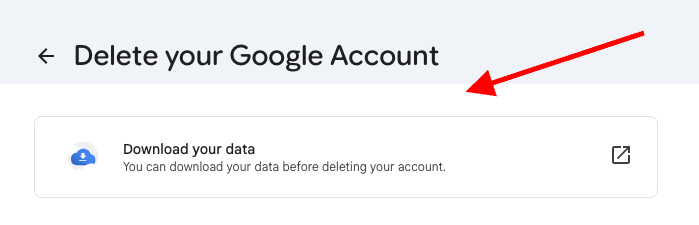
Step 4: Download your Google data
If you’d like, you can download your Google data before you delete your account. Click the box at the top of the page that says Download Your Data to start that process.
Step 5: Review the list of Google services
On the “Delete Your Google Account” page, there will be a list of services that you need to review before deleting your account. Go through each service carefully and take the steps that Google recommends. Here’s an example:
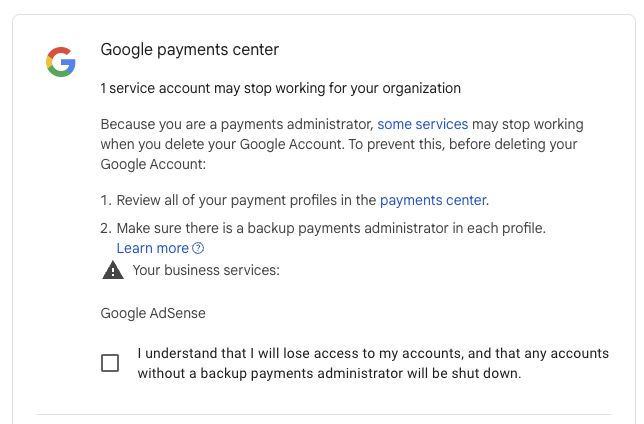
Step 6: Delete your account
Once you’ve reviewed your Google services and subscriptions and checked the confirmation boxes, click Delete Account at the bottom of the page.
How To Recover a Deleted Google Account
If you change your mind after deleting your Google account or you deleted your account by accident, you may be able to recover your content and data. While there’s no specific timeline, data usually stops being retrievable after a few weeks. If you think you want to recover your deleted account, do so ASAP for the best chance of getting your data back.
Start on this Google Account Help page. Click the link in step 1 that says Follow the Steps To Recover Your Account. This will bring you to an account recovery page where you can begin the process.
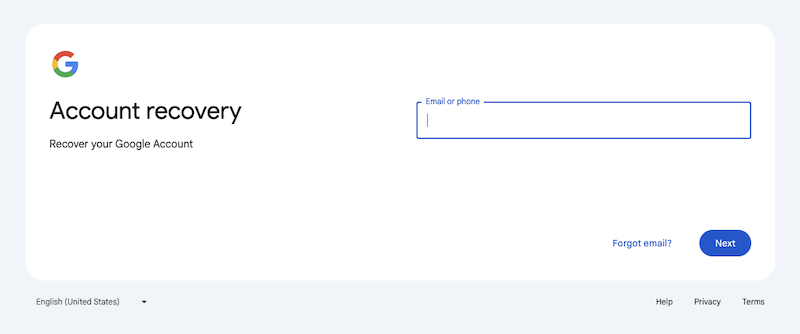
If you’re able to successfully recover your deleted account, your access to the account and all of its data should be restored. From there, it’s best to create a new password to use with the account.
FAQ About Deleting a Google Account
What happens if I delete my Google account?
Deleting your Google account means you’ll lose all of the content and data in that account, including calendars, emails, files and photos. You also won’t be able to use Google services, such as Calendar, Drive, Gmail or Play. And you’ll also lose access to content, subscriptions and Google Play purchases, including apps, games, movies, music, TV shows and YouTube.
Is Google account deletion permanent?
Yes, deleting your Google account is usually a permanent decision. According to Google Account Help, “If you change your mind, you might not be able to recover it after a certain amount of time.” It’s best to delete your account only if you’re 100% sure you won’t want to access Google services using that account in the future.
Can I download a copy of my Google account content?
Yes, before you delete your Google account, you can use Google Takeout to download your content. Data you can download includes activity logs, Google Arts and Culture favorites, calendar data, contacts, Google Chat conversations and more.
Key Takeaways
- Make sure to backup your data and assess connected third-party accounts before deleting your entire Google account permanently.
- Some Google account data can be exported before deletion, such as your calendar entries, email, files and photos.
- Review your Google services and active subscriptions prior to deletion to determine if you’re ready to lose access to them.
- Once your Google account is deleted, you can no longer use Security Checkup to review account activity.
- Deleting a Google account permanently doesn’t delete third-party accounts, but it may impact access to those accounts if you use Google to sign in.
Final Thoughts About the Choice To Permanently Delete Your Google Account

Deleting a Google account isn’t just a technical step — it’s a decision that can reshape your entire online presence and experience. While it may be an effective way to reduce your digital footprint or put distance between yourself and out-of-date information, you should have a clear plan ahead of time and a complete understanding of what deleting your Google account means.
Before you move forward, take time to save your important data, update your login credentials for connected accounts, and consider if removing specific services is a better choice than getting rid of the entire account. A thoughtful approach can help you achieve your reputation and privacy goals without causing unnecessary disruptions.
Are you still not sure which is the best path forward? That’s not a surprise — managing how you appear online is a big job. Working with an experienced online reputation management (ORM) team can help you make progress when you’re feeling stuck.
The experts at NetReputation can help you evaluate your options, minimize risks, and create a strategy that supports a cleaner, more controlled online presence. Call us today at 844-461-3632 or fill out the contact form below.