 800-200-3000
If you’ve Googled your name recently, you’ve probably seen your home address, phone number and relatives listed on sites you never signed up for. Those are people-search sites and you can remove yourself from them.
This people search opt-out guide walks through exactly how to remove yourself from people-search sites including Spokeo, Whitepages, TruePeopleSearch, FastPeopleSearch, BeenVerified, PeopleWhiz and more. You’ll also learn how to keep your information off after removal, which free people search removal methods actually work and when to hand the process off to a professional privacy service.
Why Your Information Is on People-Search Sites in the First Place
You might be wondering, “Why is my info on people search sites in the first place? I don’t remember signing up for that.”
You didn’t have to. These sites publish your name, home address, phone number, email and relatives without asking your permission because the information is drawn from public records, commercial data purchases and social media scraping. You didn’t sign up, but the sites operate legally by aggregating sources that are technically public. Most Americans are listed on 40 or more people-search sites without ever knowing they exist.
There are four main places where people-search sites can get your personal information. These include:
- Public records (property deeds, court filings, voter registration, marriage licenses)
- Social media profiles and public-facing websites
- Data purchased from commercial partners and loyalty programs
- Aggregated licensing from other people-search sites and marketing databases
Knowing where this information exists and how other parties can access it is one of the first steps you can take to protect and control your online reputation.
Why You Can’t Just Delete Yourself Once
Even after you opt out of a people-search site, the site continues pulling from its original data sources. If you move, get married, file a legal document or register a business, a new record can trigger a new listing under the same name. This is why removal isn’t a one-time task. Ongoing monitoring keeps you up-to-date on any
An online reputation management company can help you opt out of people-search sites and monitor them for new details that might appear about you in the future. This allows you to proactively step in and take control of your digital footprint for the long term.
How to Remove Yourself From People-Search Sites (The General Process)
Removing yourself from a people-search site requires a dedicated, consistent strategy. Each site has its own process, but the basic steps are consistent. Most opt-outs take between seven and 45 days to complete.
Let’s take a look at the basic 5-step people-search opt-out process.
Step 1: Find your listing. Go directly to the site and search for your name, phone number or address. Copy the URL of your listing, because most opt-out forms require it.
Step 2: Locate the opt-out form. Most sites link to the opt-out page in their footer or privacy policy. If you can’t find it, search “[site name] opt out” on Google.
Step 3: Submit the removal request. Follow the site’s specific process. Provide only what’s strictly required. Never submit a full Social Security number, even if asked.
Step 4:Verify the removal. Many sites require email or phone verification. Check your inbox (including spam) within 24 hours.
Step 5: Recheck and resubmit. Wait 30 to 45 days, then search the site again. If you’re still listed, submit a second request.
Tired of repeating this process every quarter for 40+ sites? NetReputation handles the full list continuously, so the removals actually stay removed. → Get a free privacy scan to see where your name appears and where to start.
What You Should (and Shouldn’t) Provide in an Opt-Out Request
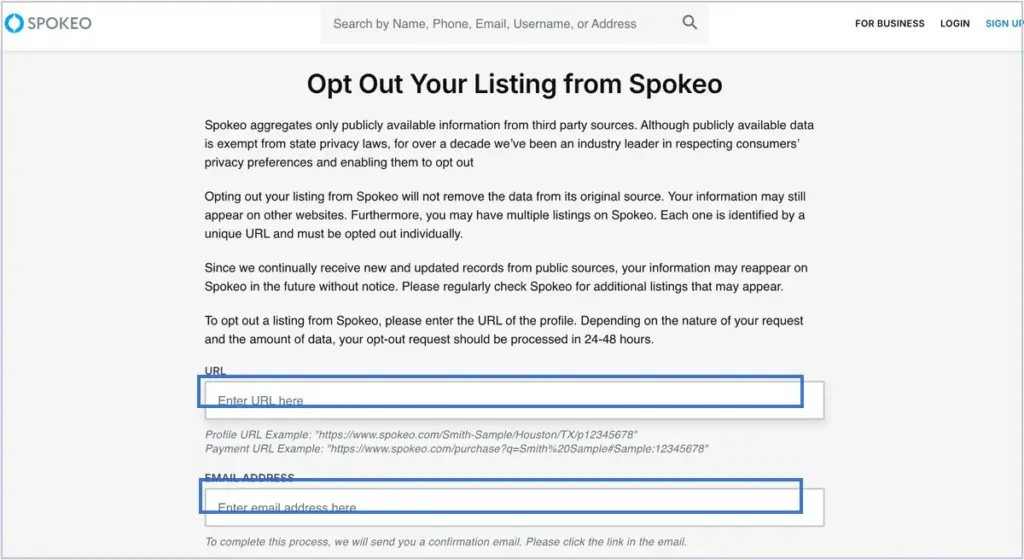
Most people-search opt-out forms ask for your name, a listing URL, an email address and sometimes a photo ID. That’s all you need to provide. Some sites ask for additional details to “verify” your request, but you’re not obligated to give them more than the minimum. Never provide the following information, despite any prompt you might see to do so:
- Your Social Security number
- Your bank information
- The passwords to any of your accounts
Free People-Search Removal: What Works and What Doesn’t
Free people-search removal is possible on almost every major site, because federal and state privacy laws require most operators to honor opt-out requests at no charge.
You can remove yourself from Spokeo, Whitepages, Intelius, BeenVerified, TruePeopleSearch and most others without paying. Paid removal services exist, but they’re charging for time and convenience, not for access to a paid-only opt-out path.
How to Opt Out of the Top People-Search Sites
Understanding how to remove yourself from people search sites is the first step toward reclaiming your personal data and restoring your online privacy.
The top people-search sites account for the majority of search-result exposure, so opt-outs there have the biggest impact. Below are the 10 highest-priority sites with a quick summary of what to expect. Each site listed links to NetReputation’s full step-by-step opt-out guide.
How to Opt Out of Spokeo
To opt out of Spokeo, find your listing at spokeo.com, copy the URL and submit it through Spokeo’s opt-out form along with your email address. You’ll receive a verification email within an hour and the removal typically takes 24 to 72 hours to process. Spokeo honors indefinite removals, but new public records can trigger a new listing later. Review our Full Spokeo Opt-Out Guide for more information.
How to Opt Out of Whitepages
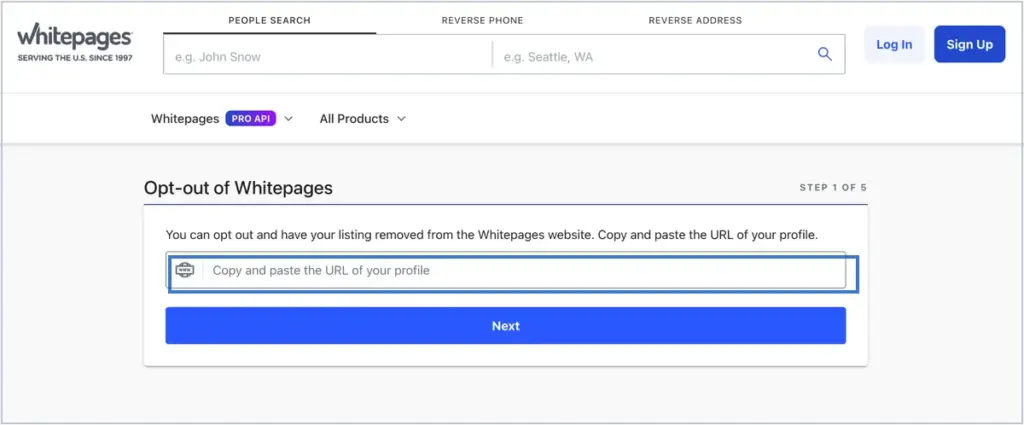
Whitepages removal requires submitting a request through the Whitepages Suppression Requests page. You’ll enter your URL listing, verify ownership via phone or email and wait up to 24 hours for removal. Whitepages has several sister brands that require separate opt-outs. Review our Full Whitepages Opt-Out Guide for more information.
How to Remove Your Name From TruePeopleSearch
Before Googling “How to remove my name from TruePeopleSearch,” start here. To opt out of TruePeopleSearch, go to the site’s opt-out page, enter your listing URL, verify your email and submit. Removal typically takes 24 to 48 hours. TruePeopleSearch is free to users, which means listings often reappear when public records update. Review our Full TruePeopleSearch Opt-Out Guide for more information.
How to Remove Information From FastPeopleSearch
FastPeopleSearch removal is handled through the site’s opt-out form. Enter your listing URL, confirm your email address and submit the request. Processing takes 48 to 72 hours. This site shares some data sources with TruePeopleSearch, so knowing how to remove information from FastPeopleSearch doesn’t remove you from the others. Review our Full FastPeopleSearch Removal Guide for more information.
How to Opt Out of BeenVerified
BeenVerified opt-outs go through the site’s privacy manager page. Submit your name and email, verify via the link sent to your inbox and the listing will be removed within 24 hours. BeenVerified is owned by PeopleConnect, which also operates Intelius, TruthFinder, Instant Checkmate and PeopleSmart. Each requires a separate opt-out. Review our Full BeenVerified Opt-Out Guide for more information.
PeopleWhiz Opt Out
PeopleWhiz opt-out is handled through the site’s Do Not Sell My Info page. Enter your name, email and the URL of your listing, then verify through a confirmation email. Processing takes seven to 10 business days. PeopleWhiz is less prominent than Spokeo or Whitepages, but its data often appears in other aggregated search results. Review our Full PeopleWhiz Opt-Out Guide for more information.
How to Opt Out of Intelius
Intelius opt-outs are processed through the site’s opt-out request form. Submit your name, email and verification details, then confirm via the link emailed to you. Removal takes 72 hours or less. Because Intelius shares a parent company with BeenVerified, TruthFinder, Instant Checkmate and PeopleSmart, each of those sites requires its own separate opt-out. Review our Full Intelius Opt-Out Guide for more information.
How to Remove Yourself From USPhoneBook
USPhoneBook removal starts at the site’s opt-out page, where you’ll enter your name and phone number and confirm via email. Processing typically takes 48 hours. USPhoneBook is a common first stop for reverse phone lookups, so removing yourself reduces your exposure to that specific type of search. Review our Full USPhoneBook Opt-Out Guide for more information.
How to Opt Out of MyLife
MyLife removal requires a direct request through the site’s contact form or by calling customer service. MyLife is known for being more difficult than other opt-outs, often requiring repeated requests and occasionally phone calls. The site uses a “reputation score” system that can persist even after your main listing is removed. Review our Full MyLife Opt-Out Guide for more information.
How to Opt Out of Radaris
Radaris removal involves creating a free account, claiming your listing and selecting the option to hide your profile. The process is more involved than most people-search opt-outs and sometimes requires multiple attempts. Radaris re-lists people more aggressively than some competitors. Review our Full Radaris Opt-Out Guide for more information.
Even More Opt-Out Guides
NetReputation maintains opt-out guides for more than 40 people-search sites beyond the top 10 listed above. If your name appears on a site that isn’t covered here, chances are there’s a guide for it.
Review our Full Opt-Out Guide Library for a comprehensive overview. Below are some of the top sites Netreputation has guides for:
- Nuwber
- PeekYou
- Zoominfo
- AnyWho
- FamilyTreeNow
- 411.com
- Yellow Pages
- Advanced Background Checks
- SmartBackgroundChecks
- PeopleSearch123
- Persopo
- RecordsFinder
- CyberBackgroundChecks
- SearchPeopleFree
These guides are continuously updated as people-search sites change their opt-out processes and redesign their pages. Removal steps may change without notice because these platforms frequently update their databases. We recommend checking back regularly to ensure your information remains removed or suppressed across all major data broker networks.
NetReputation’s team monitors emerging people-search sites and adds new opt-out instructions as they appear. If you can’t find a guide for a specific site, let us know. Our team can help you identify the most appropriate content removal process and provide step-by-step guidance tailored to that platform for faster, more reliable results.
How to Keep Your Information Off People-Search Sites After Removal
Opt-outs don’t last forever. Most people-search sites relist individuals within three to 12 months, usually when new public records are filed. To keep your information off for good, you need to recheck every site quarterly, resubmit opt-outs when your information reappears and reduce the upstream sources that feed the sites in the first place.
Consistent monitoring matters because once your data spreads to aggregators, it can quickly repopulate across dozens of people-search sites. A long-term privacy strategy is far more effective than relying on one-time removals alone.
Here’s how to remove yourself from people-search sites for the long term:
- Recheck quarterly. Schedule a calendar reminder for every 90 days. Search each site you’ve previously opted out of.
- Resubmit when you reappear. If you’re relisted, submit a new opt-out request immediately.
- Limit new public records when possible. Use a PO box for business filings and domain registrations where legally permissible.
- Audit your social media privacy. Social media is one of the largest upstream sources for people-search sites.
- Opt out of commercial data sources. LexisNexis, CoreLogic and SageStream accept opt-out requests that reduce what people-search sites can license downstream.
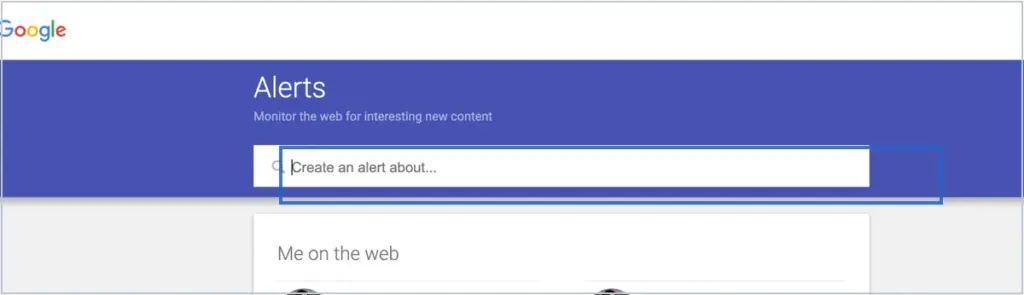
- Monitor search results. Set a Google Alert for your full name, phone number and home address.
When DIY People-Search Removal Isn’t Enough
DIY removal works for people with the time and patience to manage 40+ sites quarterly. It stops working when listings keep reappearing faster than you can remove them, when sites ignore your opt-out requests, when your exposure ties to a safety risk or when you simply don’t have five to 10 hours per quarter to maintain the process.
NetReputation’s professional internet privacy services handle the full list continuously, so the removals actually stay removed.
Here are a few scenarios when professional people-search removal makes sense:
- Listings keep reappearing despite repeated opt-outs
- You’ve been doxxed, stalked or harassed
- You’re an executive or public figure whose exposure creates business risk
- Your family’s information is listed alongside yours
- You’re preparing for a job search, board role or major business transaction
- You need results fast and can’t wait for 30-45 day DIY timelines
- You don’t have the time or patience to manage 40+ recurring opt-outs
People-search site removal is part of our greater personal reputation management service, designed to help you strengthen your online image, improve visibility and unlock new opportunities.
Schedule a free privacy scan today to see which sites you’re listed on and learn more about our professional content removal services.
When Personal People-Search Exposure Becomes a Business Risk
For executives, founders and public-facing professionals, people-search exposure crosses from a personal privacy concern into a serious business vulnerability. Executive personal information privacy is now closely tied to broader business reputation and security concerns, especially when online data is easily accessible.
An executive’s home address on Spokeo becomes a physical security risk during a company controversy. A founder’s relatives listed on Whitepages become leverage points for social engineering attacks. Personal and business exposure aren’t separate when you’re visible. This is why many organizations now incorporate VIP reputation management into their overall risk mitigation strategies.
Individuals who could face business risk with people-search exposure include:
- Executives facing activist harassment campaigns
- Founders whose home addresses appear during fundraising due diligence
- Board members with litigation histories surfacing alongside business profiles
- Leaders whose family members are targeted in pressure campaigns
- Public-facing professionals whose personal information enables impersonation scams
- Small business owners whose personal reputation IS the business reputation
Contact us for a Free Executive Privacy and Reputation Analysis to identify your online exposure risks, protect your sensitive personal information and strengthen your personal and professional reputations.
Frequently Asked Questions
Below are answers to the most common questions we receive about opting out of people-search sites.
How do I opt out of people-search sites?
Our five-step people-search opt-out process helps you remove your private information and reclaim control of your online reputation.
These steps include finding your listing on the site, locating the opt-out form or email address, submitting a removal request, verifying the removal via email or phone and rechecking in 30 to 45 days to ensure the content is still removed.
Is free people-search removal actually possible?
Yes, free people-search removal is possible on almost every site. Paid services are available for this service, but they charge for time, not for access to a paid-only opt-out path.
How long does people-search removal take?
Standard people-search removal services take anywhere from seven to 45 days. Timelines can vary based on the site’s specific removal process. Some are faster while others take more time.
How do I remove personal information from people-search sites that aren’t listed here?
Wondering how to remove personal information from people-search sites that aren’t on our list? Start by searching “[site name] opt out” on Google. Most sites have an opt-out page. If the site doesn’t, you can send a formal request via the site’s contact email or reach out for professional help.
Do people-search opt-outs stay permanent?
Usually not. Most sites relist individuals when new public records appear. This is why it’s smart to check and maintain your results quarterly, restarting the people-search removal process if new records appear.
How do I remove my name from TruePeopleSearch?
First, visit the TruePeopleSearch opt-out page. Then, enter your listing URL, verify your email and submit your removal request. Removal typically takes 24 to 48 hours. Review our Full TruePeopleSearch Opt-Out Guide for more information.
How do I remove information from FastPeopleSearch?
If you need to know how to remove information from FastPeopleSearch, start at the site’s opt-out form. Enter your listing URL, confirm your email address and submit the request. Removal takes 48 to 72 hours. Review our Full FastPeopleSearch Removal Guide for more information.
How do I opt out of PeopleWhiz?
PeopleWhiz opt-out starts on the site’s Do Not Sell My Info page. Enter your name, email and the URL of your listing and verify via email. Processing takes seven to 10 business days. Review our Full PeopleWhiz Opt-Out Guide for more information.
Why does my information keep coming back after I remove it?
Most people-search sites relist individuals within three to 12 months or any time new public records are filed. They legally gather this information by aggregating sources that are technically public including public records, commercial data purchases and social media scraping. This is why long-term content removal monitoring is necessary.
Take Back Control of What People-Search Sites Show About You
Removing yourself from people-search sites takes time, but it’s one of the highest-impact steps you can take for your privacy. Whether you work through the list yourself or hand the process off to a service, the goal is the same: make yourself harder to find when someone goes looking.
Get a free privacy scan to see where your data appears and learn the most effective next steps for managing your online reputation.
 800-200-3000
 Rated #1 by Newsweek
 4.9/5 Trustpilot
 100% Confidential